BUILT FOR THE AWS HACKATHON
DossierRelay
From scattered requests
to a clear next step.
One place for client conversations, reviewed documents and responses you control.
Open the workspaceThe local demo opens directly. AWS judge access is provided privately. Read the judge guide.
Explore the workflow ↓THE WORKFLOW
Every next step.
With its source.
AI can help prepare the response. You decide what is accepted, approved and shared.
- 01
Capture the request
Start a case and keep the conversation, contact permission and required documents together.
- 02
Review the evidence
Preview each uploaded document, verify its bytes and record your assessment. A filename never counts as approval.
- 03
Prepare a clear response
Draft manually or use Amazon Nova through AgentCore Runtime and Bedrock. Check the source messages before approving the exact text.
- 04
Close the loop
Share the approved response in the client portal. Collect replies and documents, then export the case with its evidence trail.
A HANDS-ON WALKTHROUGH
Try one complete client journey.
The primary judging route is a synthetic Business case. Follow the judge guide, generate a client link and upload these approved practice files. Inspect each one before accepting it.
Fictional practice documents. The engagement letter is a simulation, not a legally signed agreement.
Start the walkthroughAWS ARCHITECTURE
Connected by design.
Controlled by you.
API Gateway and Lambda serve the workspace. DynamoDB stores versioned cases and S3 stores documents. For AI, Application Lambda → AgentCore Runtime → Amazon Nova on Bedrock. Consent, case versions, exact approval and SES sending stay in the application, outside AgentCore.
Read the testing guide ↗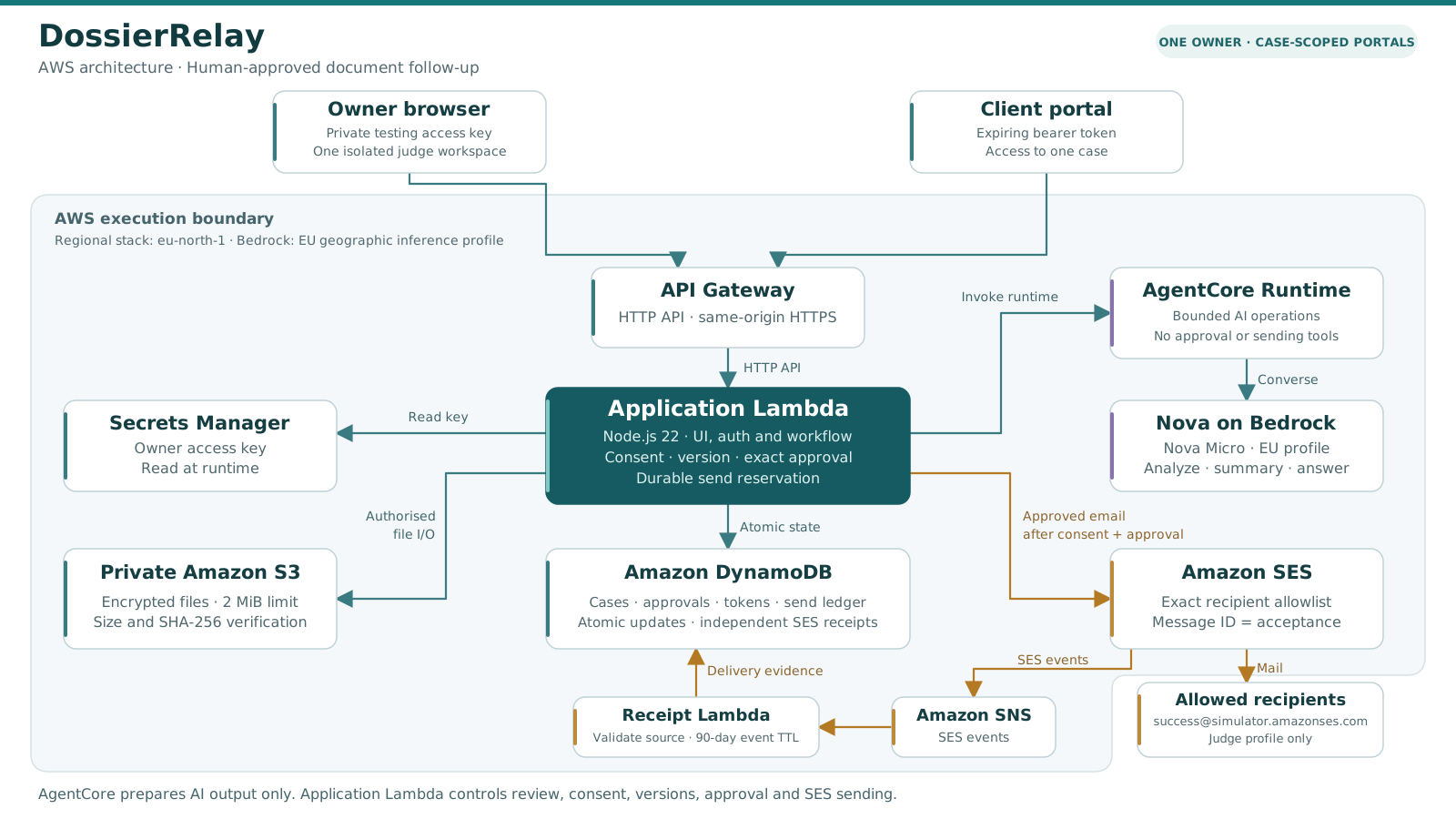
LESS CHASING. MORE CLARITY.
Keep the case moving.
Open DossierRelayUse synthetic data for the hackathon walkthrough. Availability is checked when this page is served by the workspace; configuration alone does not prove a model call or email delivery.